

Use Cases
The Custom Button widget is incredibly flexible and can be used for various scenarios. You can use anyaction_id that makes sense for your business - the examples below are just suggestions:
- Claim a Discount (e.g.,
action_id: "claim_discount_10off") - Apply discounts to customer accounts - Join a Waitlist (e.g.,
action_id: "join_waitlist_product_123") - Add customers to product waitlists - Claim a Gift (e.g.,
action_id: "claim_birthday_gift") - Redeem promotional items or gifts - Swap to Quarterly (e.g.,
action_id: "change_to_quarterly") - Switch billing cycles or subscription plans
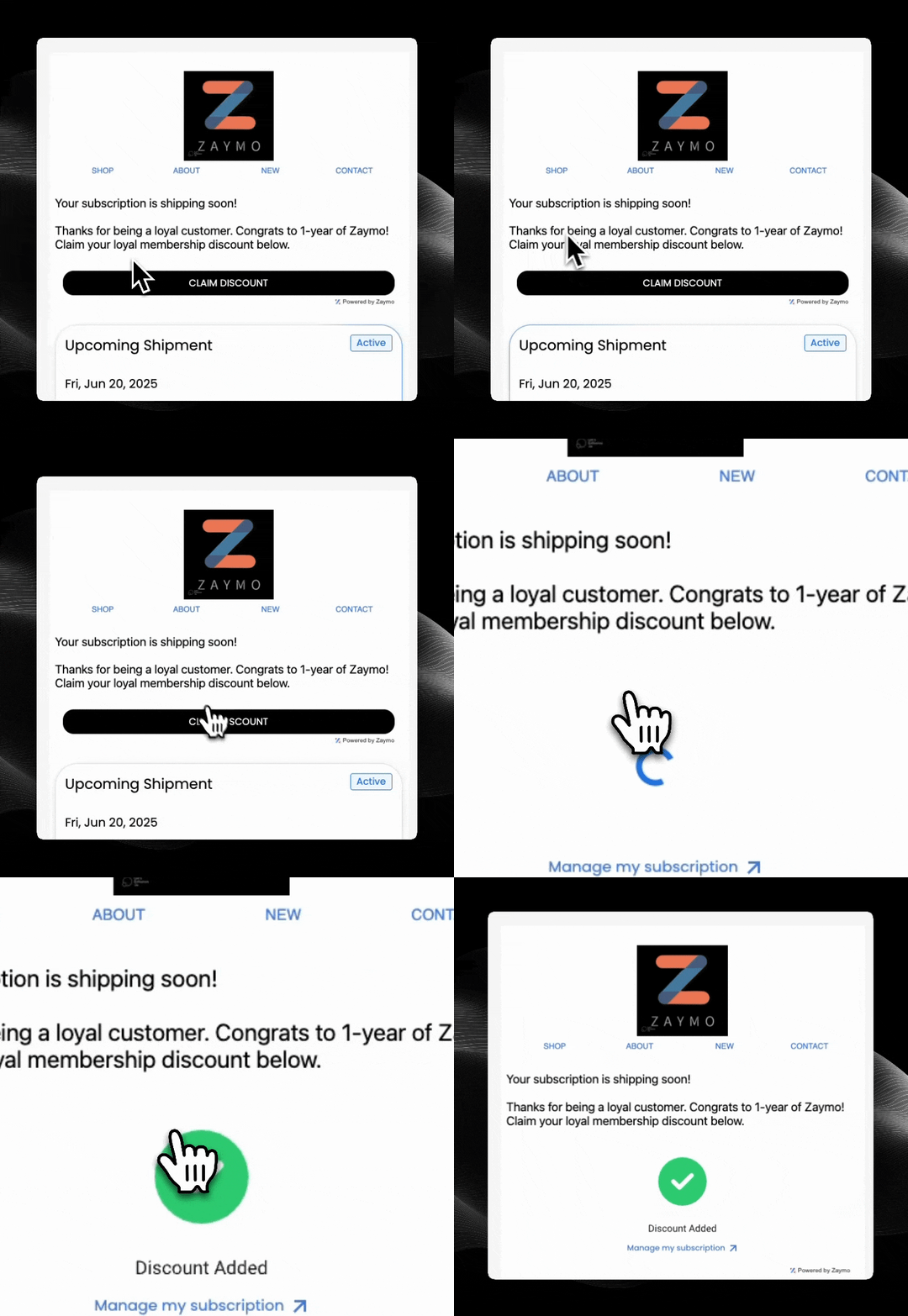
Example of a custom button in email
How It Works
- Customer receives an email with a custom action button
- Customer clicks the button to trigger the action
- Zaymo calls your custom endpoint with the customer’s email and action ID
- Your endpoint processes the action and returns a response
- Customer receives instant feedback without leaving their email
Required Endpoints
Getting Started
The Custom Button widget provides maximum flexibility for creating unique in-email experiences tailored to your specific business needs. When a customer clicks your custom button, Zaymo will call your endpoint with:- email: The email address of the customer who clicked the button
- action_id: A unique identifier for the specific action taken