> ## Documentation Index
> Fetch the complete documentation index at: https://docs.zaymo.com/llms.txt
> Use this file to discover all available pages before exploring further.
# Custom Button (NEW)
> Connect any endpoint to enable custom actions directly from email
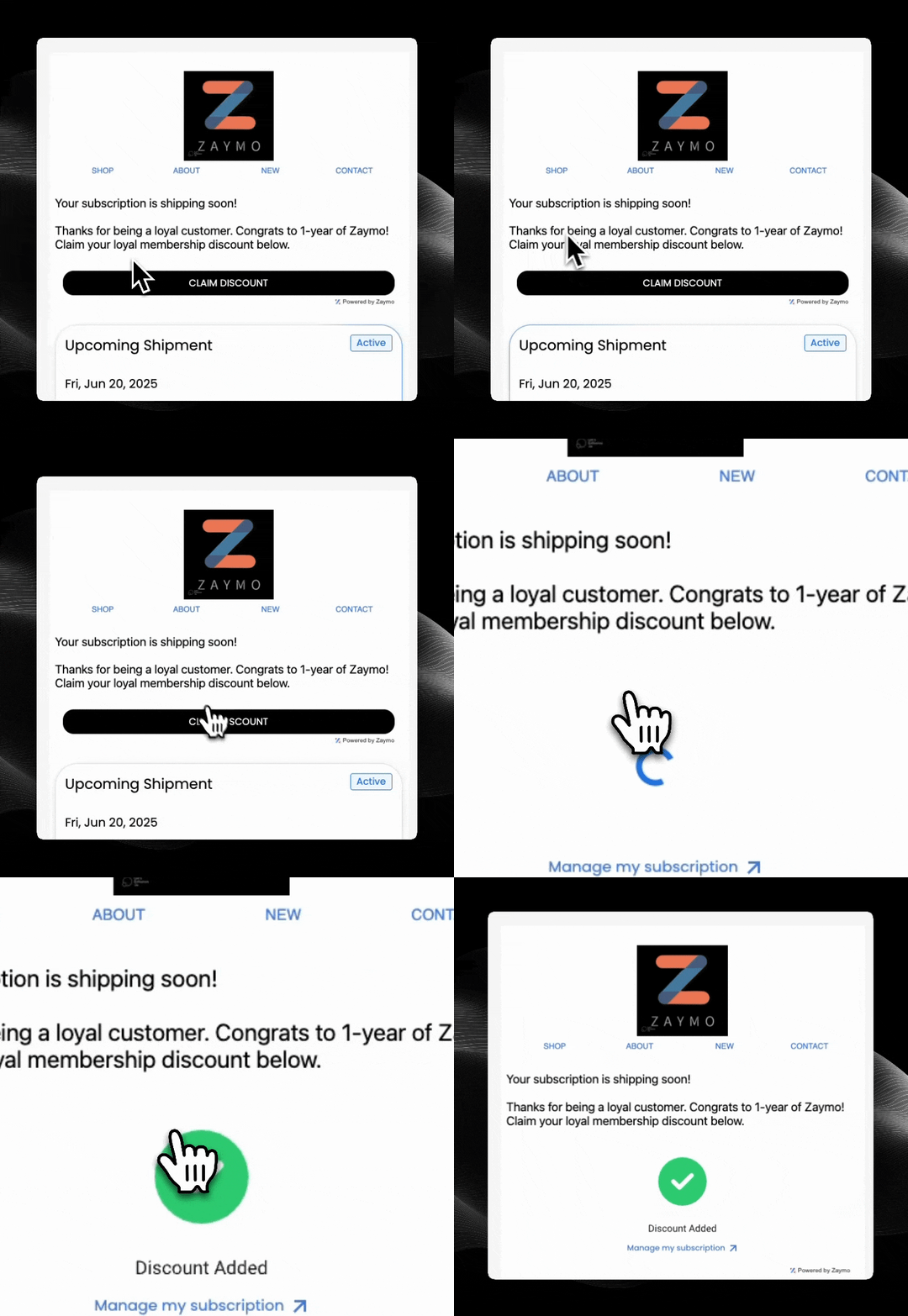
The Custom Button widget allows you to connect any endpoint to a button in your emails, enabling customers to perform any custom action directly from their inbox with just one click.
## Use Cases
The Custom Button widget is incredibly flexible and can be used for various scenarios. You can use any `action_id` that makes sense for your business - the examples below are just suggestions:
* **Claim a Discount** (e.g., `action_id: "claim_discount_10off"`) - Apply discounts to customer accounts
* **Join a Waitlist** (e.g., `action_id: "join_waitlist_product_123"`) - Add customers to product waitlists
* **Claim a Gift** (e.g., `action_id: "claim_birthday_gift"`) - Redeem promotional items or gifts
* **Swap to Quarterly** (e.g., `action_id: "change_to_quarterly"`) - Switch billing cycles or subscription plans
 ## How It Works
1. Customer receives an email with a custom action button
2. Customer clicks the button to trigger the action
3. Zaymo calls your custom endpoint with the customer's email and action ID
4. Your endpoint processes the action and returns a response
5. Customer receives instant feedback without leaving their email
## Required Endpoints
| Endpoint | Purpose | Required |
| ---------------------------------------------------------------------------- | ------------------------------------------------ | -------- |
| [Execute Custom Action](/api-reference/custom-actions/execute-custom-action) | Process the custom action when button is clicked | Yes |
## Getting Started
The Custom Button widget provides maximum flexibility for creating unique in-email experiences tailored to your specific business needs. When a customer clicks your custom button, Zaymo will call your endpoint with:
* **email**: The email address of the customer who clicked the button
* **action\_id**: A unique identifier for the specific action taken
Your endpoint can then process this information however you need and return a success or failure response to the customer.
## How It Works
1. Customer receives an email with a custom action button
2. Customer clicks the button to trigger the action
3. Zaymo calls your custom endpoint with the customer's email and action ID
4. Your endpoint processes the action and returns a response
5. Customer receives instant feedback without leaving their email
## Required Endpoints
| Endpoint | Purpose | Required |
| ---------------------------------------------------------------------------- | ------------------------------------------------ | -------- |
| [Execute Custom Action](/api-reference/custom-actions/execute-custom-action) | Process the custom action when button is clicked | Yes |
## Getting Started
The Custom Button widget provides maximum flexibility for creating unique in-email experiences tailored to your specific business needs. When a customer clicks your custom button, Zaymo will call your endpoint with:
* **email**: The email address of the customer who clicked the button
* **action\_id**: A unique identifier for the specific action taken
Your endpoint can then process this information however you need and return a success or failure response to the customer.